

- 摘要
- Seavor Template Kit: Quick, professional website creation for businesses with Elementor Page Builder. Customize fonts, colors, and design features without coding. Includes 10+ pre-designed pages and optimized for free & premium themes. Elementor Pro upgrade required for some templates. Install via Envato Elements plugin.
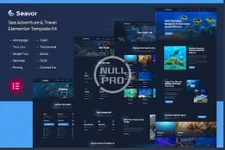
Seavor is an Elementor Template Kit for quickly and easily creating websites for your business using the Elementor Page Builder plugin for WordPress. This is not a WordPress theme. Template Kits contain page content for Elementor page builder. This kit has been optimized for use with the free Hello Elementor theme but may be used with most themes that support Elementor.
Features
- True no-code customization with drag and drop visual builder
- Customize fonts and colors in one place or fine-tune on individual elements
- Modern, professional design
- Fast-loading
- Works with most Elementor themes.
- Homepage
- Tour List Page
- Single Tour Page
- Services Page
- Pricing Page
- Team Page
- Testimonial Page
- About Us Page
- FAQs Page
- Contact Us Page
- Header Template For Theme Builder
- Footer Template For Theme Builder
How to Use Template Kits:
- Install and Activate the "Envato Elements" plugin from Plugins > Add New in WordPress
- Download your kit file and Do not unzip
- Go to Elements > Installed Kits and click the Upload Template Kit button. You may also import automatically by clicking Connect Account to link your Elements subscription, then import under Elements > Template Kits.
- Check for the orange banner at the top and click Install Requirements to load any plugins the kit uses
- Click import on the Global Kit Styles first
- Click Import on one template at a time. These are stored in Elementor under Templates > Saved Templates.
- Go to Pages and create a new page and click Edit with Elementor
- Click the gear icon at lower-left of the builder to view page settings and choose Elementor Full Width and hide page title
- Click the gray folder icon to access My Templates tab and then Import the page you'd like to customize.


