

- PrestaShop 兼容性
- 1.7.x
- 8.x
- 摘要
- display attributes / combinations out on the category page and homepage
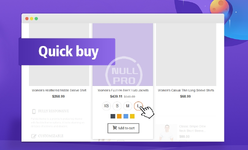
This quick buy module can display attributes / combinations out on the category page and homepage, so customers can choose and buy conveniently from the category page and homepage. Super useful for some products, customers can choose attributes without going to the product detail page.
Quick buy module for PrestaShop 1.7 is super useful in some cases, it can display attributes/combinations out on the product page and homepage, so the user can choose and buy conveniently without going to the product page.
Add a quick buy form for products, so customers can choose attributes/combinations, set quantity and buy, no need to go to the product detail page.
- Possibility to hide unavailable product attributes.
- Possibility to show quantity box out or not.
- Ability to force attributes in "Select" type to be displayed as "Radio" type.
- Change product image when combination is changed.
- Change product price when combination is changed.
- Ability to don't display buy button, so you can use this module to simply show all attributes out.
3 Ways to select products to apply this module on.
- All. For example, if your site sells shoes only, then you can set to show sizes out for all products.
- By category. If you sells several different types of products, you can use this feature to apply this module on certain categories.
- By manufacturer. You can choose manufacturers to apply this module.
- Match your site design, you can set this module to match your site design.
- Custom css code.
- PrestaShop 1.7
- Transformer theme v4, Panda theme v2, Classic theme and all other standard themes.
This "Quick buy module" can be installed easily without editing any files.
How to install? Use the "Upload a module" button on "BO > Modules" page to install the module.
How to upgrade? Use the "Upload a module" button on "BO > Modules" page to upload the new version to your site, it's the same as how to install, don't worry all your data will be safe, PrestaShop will just upload updated files to your site, it won't reinstall this module.


