

- XF 兼容性
- 2.3.x
- 2.2.x
- 摘要
- MusaPekel FindNode is a live filtering widget for XenForo 2.3 that instantly narrows down categories and forums on the forum index without leaving the page, supporting All, Forums only, or Categories only modes. Ideal for faster discovery and theme-friendly use, it's keyboard accessible and works seamlessly with most themes. Installation is simple via AdminCP or CLI; recommended positions include forumoverviewtop and forumlistsidebar.
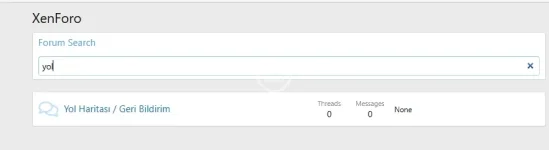
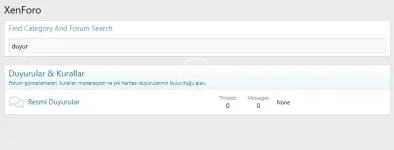
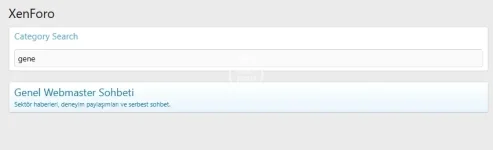
MusaPekel FindNode is a live filtering widget for XenForo 2.3 that lets users quickly narrow down categories and forums on the forum index without leaving the page. As users type, the on-page list is filtered in real time. It supports three modes:
All: Matches both category titles and forum titles.
Forums only: Matches forum titles only; category headers are hidden while searching.
Categories only: Matches category titles only; forum rows are hidden while searching.
Why use it?
Faster discovery: Jump to the right forum or category instantly on large boards.
In-place filtering: No page reloads, no redirects—just instant narrowing of the current list.
Theme friendly: Uses default XenForo selectors; compatible with most themes.
Accessible: Keyboard-friendly search and filter flow.
Installation & Placement
Install the add-on (AdminCP or CLI).
Go to Appearance → Widgets and add Find Node (musapekel_find_node).
Recommended positions:
forum_overview_top (top of forum list)
forum_list_sidebar (sidebar)
Optional: In Widget Options, choose Filter type: All, Forums only, or Categories only.
How it works
The widget targets forum index category/forum DOM nodes only.
Input is normalized (diacritics/Turkish letters) and filtering is applied on the fly.
Visibility of category headers and/or forum rows is toggled according to the selected mode.
Performance & Compatibility
Client-side only (vanilla JS), no extra HTTP requests.
Scales well; for extremely large boards, consider tightening CSS selectors to your theme.
Verified on XenForo 2.3. Custom themes may require minor selector tweaks.
FAQ / Troubleshooting
“Widget doesn’t work in sidebar.” The script waits for the main content to mount. If it still fails, your theme may use different class names—adjust selectors (e.g., .block--category, .node--forum, .block-row.node, .node-title a).
“Column 'title' / 'active' is unknown.” Use correct XF:Widget / XF:WidgetDefinition fields for XF 2.3. Fields like title/active/display_order aren’t DB columns; ordering lives inside the positions JSON.
All: Matches both category titles and forum titles.
Forums only: Matches forum titles only; category headers are hidden while searching.
Categories only: Matches category titles only; forum rows are hidden while searching.
Why use it?
Faster discovery: Jump to the right forum or category instantly on large boards.
In-place filtering: No page reloads, no redirects—just instant narrowing of the current list.
Theme friendly: Uses default XenForo selectors; compatible with most themes.
Accessible: Keyboard-friendly search and filter flow.
Installation & Placement
Install the add-on (AdminCP or CLI).
Go to Appearance → Widgets and add Find Node (musapekel_find_node).
Recommended positions:
forum_overview_top (top of forum list)
forum_list_sidebar (sidebar)
Optional: In Widget Options, choose Filter type: All, Forums only, or Categories only.
How it works
The widget targets forum index category/forum DOM nodes only.
Input is normalized (diacritics/Turkish letters) and filtering is applied on the fly.
Visibility of category headers and/or forum rows is toggled according to the selected mode.
Performance & Compatibility
Client-side only (vanilla JS), no extra HTTP requests.
Scales well; for extremely large boards, consider tightening CSS selectors to your theme.
Verified on XenForo 2.3. Custom themes may require minor selector tweaks.
FAQ / Troubleshooting
“Widget doesn’t work in sidebar.” The script waits for the main content to mount. If it still fails, your theme may use different class names—adjust selectors (e.g., .block--category, .node--forum, .block-row.node, .node-title a).
“Column 'title' / 'active' is unknown.” Use correct XF:Widget / XF:WidgetDefinition fields for XF 2.3. Fields like title/active/display_order aren’t DB columns; ordering lives inside the positions JSON.


![[AddonFlare] (AJAX) Advanced Forum Stats](/data/resource_icons/0/800.jpg?1720149240)
![[AndyB] Classified forums](/data/resource_icons/3/3499.jpg?1720149256)
![[AndyB] Article forums](/data/resource_icons/14/14790.jpg?1720149311)