
![[cXF] Enhanced Featured Content Carousel](/data/resource_icons/27/27774.jpg?1779642109)
- XF 兼容性
- 2.3.x
- 摘要
- Enhance your eReader experience with our featured content carousel widget. Display images from the first post, customize options like title placement, image size, and more. Customize further with Font Awesome icons or dynamic avatars for unique flair.
Use the default featured content carousel widget with some extra features. The main feature is to display the image from the first post in the carousel.
Check the FAQ tab for help.
DEMO on eReadersForum.com (at the bottom of the page!)
Features:
Screenshots:
< default settings with the image from the first post and a user avatar (if there is no image) >
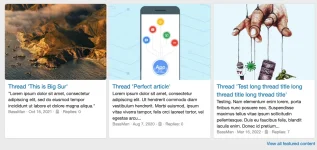









Check the FAQ tab for help.
DEMO on eReadersForum.com (at the bottom of the page!)
Features:
- option to display an image to the left of, above or behind the thread title
- option to show widget title above the carousel
- option to adjust the radius of the image/avatar (you can make it square)
- option to set the number of slides to display at once
- option to change image aspect ratio (4/3 or 16/9)
- if there is no image in the first post, you can set it to show the thread starter's avatar, a custom image (option to upload any image) or the Font Awesome icon
- option to adjust the avatar font size if you are using a dynamic avatar and displaying an image above the thread title
- option to set the resize for custom image (cover, contain or none)
- option to set Font Awesome icon style, name, size, color and background
- option to hide thread title, thread snippet and other footer elements (is showing the image behind the text)
Screenshots:
< default settings with the image from the first post and a user avatar (if there is no image) >

![[XTR] AI Assistant](/data/resource_icons/27/27766.jpg?1779346559)

![[cXF] Enhanced controls for approval queue](/data/resource_icons/1/1367.jpg?1748795983)
![[cXF] Enhanced Featured Content List](/data/resource_icons/23/23287.jpg?1735384844)
![[cXF] Enhanced Trending Content Carousel](/data/resource_icons/23/23859.jpg?1739526735)