成员备注

成员备注 1.7

没有下载权限
XF 兼容性
  1. 2.3.x
  2. 2.2.x
摘要
为仅限员工创建个性化会员笔记变得容易。可以直接从管理控制面板显示和编辑会员笔记。无缝地通过用户组设置增强用户组权限。
显示会员备注小部件。
允许员工创建会员备注。只有员工才能查看和编辑这些备注。
(会员备注示例在个人资料页面)
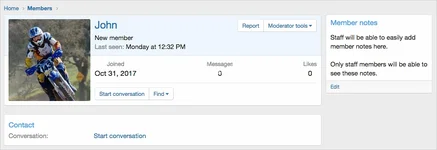
pic001.webp

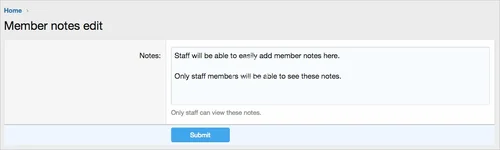
(成员笔记编辑页面示例)
pic002.webp

(示例用户组权限)
pic003.webp

特点:
  • []所有词语开头为membernotes_以供您的便利
创建widget:
  1. []管理员控制面板 -> 界面设置 -> 小工具[]*]Widget 定义 = 会员备注[]*]Widget key = member_notes[]*[标题 = (留空)[]显示位置 = 会员视图:侧边栏[]保存。
用户组权限:通常您将选择以下用户组中的Yes:
管理级
Moderating数据库更改:创建了一个名为xf_andy_member_notes的表在您的数据库中。
作者
axtona
浏览
549
扩展类型
zip
文件大小
19.5 KB
首次发布
上次更新
评分 0.00 星 0 个评分
链接失效了吗? 发送消息 给 NP 团队,我们会尽快为您处理!
支持开发者 如果您对测试满意或项目已成功盈利,可点击「更多信息」按钮,通过购买来支持开发者!

最新更新

  1. 1.7 - change log
    Member notes block is now displayed below member tabs.

来自 axtona 的更多资源

XenForo Kalium Theme A
make your site stand out with its numerous features.
Keep the XenForo Editor Toolbar Sticky While Scrolling A
With this code, you can keep the editor toolbar fixed at the top of the page as you scroll
Marmaris A
Marmaris 1.0.0
Marmaris Style is a clean and modern dark theme inspired
返回
顶部