

- Short Description
- Transform your forum's avatar selection with a dynamic, zero-configuration gallery.
Transform your forum's avatar selection with a dynamic, zero-configuration gallery.
Avatar Gallery automatically scans your server directories to present users with a curated collection of avatars, organized neatly into native tabs.
Features
Dynamic Discovery: Simply drag and drop images into folders. No manual database entries or complex admin panels required.
Native Organization: Avatar Gallery uses directory names to automatically generate tabs.
Images in the root folder → Default tab.
Images in Zombies/ → Zombies tab.
Images in Retro/ → Retro tab.
Style Adaptive: Built with XenForo's native style properties, ensuring perfect integration with any light or dark theme out of the box.
Performance First:
Caching: Directory scans are cached for 1 hour to ensure zero impact on server load.
Lazy Loading: All gallery images utilize native lazy loading for instant page rendering.
Seamless UX: Integrated directly into the native Avatar settings page.
Installation
Upload the Add-on
Upload the contents of the upload directory to your XenForo root.
Install
Log in to your Admin Control Panel.
Go to Add-ons and click Install for AvatarGallery.
Populate Your Gallery
Navigate to data/gallery_avatars/Global/ on your server.
Upload your avatar images (JPG, PNG, GIF, WEBP).
(Optional) Create folders like Heroes, Villains to automatically categorize them into tabs.
Download Avatar Collections
We've curated a high-quality collection of avatars to get you started.
Download: Get the full collection from our GitHub Repository.
Upload: Extract the ZIP and upload the folders (e.g., Character, GTA, PixelArt) into your data/gallery_avatars/Global/ directory.
Enjoy: The new tabs will automatically appear in your gallery!
FAQ
Q: How do I rename a tab?
A: Simply rename the folder in data/gallery_avatars/Global/. The tab name reflects the folder name (e.g. premium_icons becomes "Premium_icons").
Q: I added images but they aren't showing up?
A: The file list is cached for performance. You can clear the cache or simply wait up to 1 hour for changes to reflect.
Q: Does this replace custom uploads?
A: No. Users can still upload their own avatars as normal. This provides an additional, curated choice.
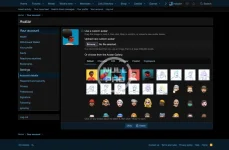
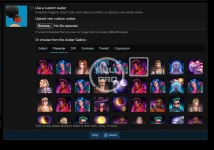
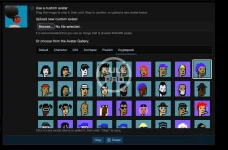
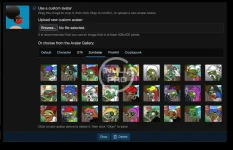
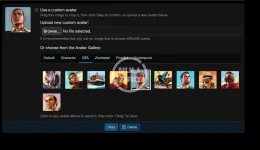
Avatar Gallery automatically scans your server directories to present users with a curated collection of avatars, organized neatly into native tabs.
Features
Dynamic Discovery: Simply drag and drop images into folders. No manual database entries or complex admin panels required.
Native Organization: Avatar Gallery uses directory names to automatically generate tabs.
Images in the root folder → Default tab.
Images in Zombies/ → Zombies tab.
Images in Retro/ → Retro tab.
Style Adaptive: Built with XenForo's native style properties, ensuring perfect integration with any light or dark theme out of the box.
Performance First:
Caching: Directory scans are cached for 1 hour to ensure zero impact on server load.
Lazy Loading: All gallery images utilize native lazy loading for instant page rendering.
Seamless UX: Integrated directly into the native Avatar settings page.
Installation
Upload the Add-on
Upload the contents of the upload directory to your XenForo root.
Install
Log in to your Admin Control Panel.
Go to Add-ons and click Install for AvatarGallery.
Populate Your Gallery
Navigate to data/gallery_avatars/Global/ on your server.
Upload your avatar images (JPG, PNG, GIF, WEBP).
(Optional) Create folders like Heroes, Villains to automatically categorize them into tabs.
Download Avatar Collections
We've curated a high-quality collection of avatars to get you started.
Download: Get the full collection from our GitHub Repository.
Upload: Extract the ZIP and upload the folders (e.g., Character, GTA, PixelArt) into your data/gallery_avatars/Global/ directory.
Enjoy: The new tabs will automatically appear in your gallery!
FAQ
Q: How do I rename a tab?
A: Simply rename the folder in data/gallery_avatars/Global/. The tab name reflects the folder name (e.g. premium_icons becomes "Premium_icons").
Q: I added images but they aren't showing up?
A: The file list is cached for performance. You can clear the cache or simply wait up to 1 hour for changes to reflect.
Q: Does this replace custom uploads?
A: No. Users can still upload their own avatars as normal. This provides an additional, curated choice.


![[OzzModz] Avatar Gallery](/data/resource_icons/4/4318.jpg?1720149256)
![[Xen-Soluce] Avatar Gallery](/data/resource_icons/0/205.jpg?1724818358)
![[AndyB] Avatar manager](/data/resource_icons/24/24138.jpg?1742296706)