
![[AndyB] XFRM ad manager](/data/resource_icons/4/4408.jpg?1720149256)
- XF 兼容性
- 2.2.x
- 摘要
- Easily manage your Google AdSense in XenForo Resource Manager.
Easily manage your Google AdSense in XenForo Resource Manager.
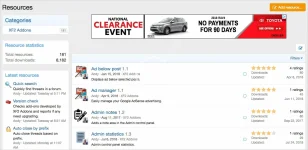
(Example of AdSense on overview page
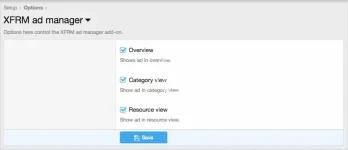
(Example of Options page)
(Example of User group permissions)

Features:
Q: How can I control the spacing of the ads?
A: Edit the andy_xfrmadmanager.less template.
(Example of AdSense on overview page
(Example of Options page)
(Example of User group permissions)
Features:
- Ads are displayed in overview, category view and resource view.
- Options page allows disabling ads from specified areas.
- User Group Permissions determine which user groups see ads.
- Edit the andy_xfrmadmanager template and update using your AdSense code.
- Set the appropriate user group permissions, typically the following two user groups are set to Yes.
Registered
Unregistered / Unconfirmed
- Log into your Google AdSense account.
- Click My Ads.
- Click Ad units.
- Click New ad unit.
- Click Text and display ads.
- Enter a Name for this ad. Example enter "Responsive" as the name.
- Save and get code.
Q: How can I control the spacing of the ads?
A: Edit the andy_xfrmadmanager.less template.

![[AndyB] User Agent](/data/resource_icons/4/4358.jpg?1720149256)
![[AndyB] Forum reply ban](/data/resource_icons/5/5016.jpg?1743490331)
![[AndyB] Ad manager](/data/resource_icons/8/8631.jpg?1720149279)
![[AndyB] Affiliate manager](/data/resource_icons/4/4391.jpg?1720149256)
![[AndyB] Attachment Manager](/data/resource_icons/4/4500.jpg?1720149262)